
October 20, 2026
HVAC Web Design Guide: Complete 2026 Strategy for Contractors
HVAC website design guide for contractors: essential pages, platform comparison, Core Web Vitals, and conversion tactics to turn visitors
Published On: September 15, 2026
Published By: Designocracy

People use "UI" and "UX" like they mean the same thing. They don't. And if you're planning a website or app, mixing them up can lead to hiring the wrong person or skipping a step your project actually needs.
This guide breaks down the difference in plain language, with examples you can actually picture. If you're working on a project right now, Designocracy's UI/UX design services cover both sides of this, but it still helps to understand what each one means before you start.
UX design (user experience) focuses on how a product works, including navigation, structure, and ease of completing tasks. UI design (user interface) focuses on how a product looks, including colors, buttons, typography, and layout. UX comes first and shapes the structure. UI comes after and shapes the visual details on top of that structure.
Both are needed for a website or app to work well. One without the other usually results in a product that either looks good but confuses users or works fine but feels outdated.
UX stands for user experience. It's the process of figuring out how a person moves through a product and whether that journey feels smooth or frustrating.
UX designers ask questions like
A UX designer might not touch colors or fonts at all. Their work often starts with wireframes, plain black-and-white layouts that map out where things go, before any visual design happens.
Think about checking out on an online store. If the checkout takes eight steps and asks for information twice, that's a UX problem. Fixing it might mean cutting it down to three steps and removing repeated fields. Nothing about the color scheme changed, but the experience got better.
UI stands for user interface. It's everything a person sees and interacts with directly: buttons, icons, spacing, color, typography, and layout.
UI designers focus on:
If UX is the blueprint, UI is the paint, finishes, and furniture that make the space usable and pleasant to look at.
Take that same checkout page. Once the structure is fixed, a UI designer decides how the "Complete Purchase" button looks, what color makes it stand out, how much space surrounds it, and what font size makes it readable without straining.
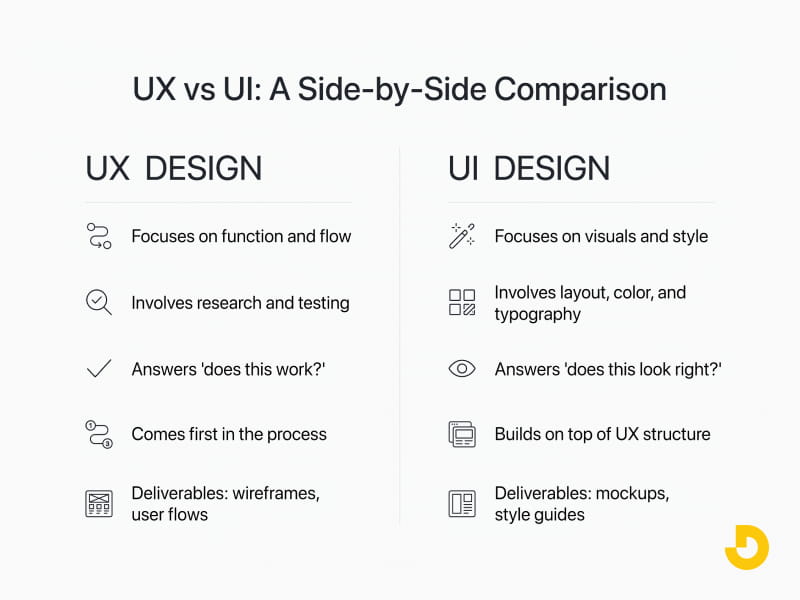
| UX Design | UI Design |
|---|---|
| Focuses on function and flow | Focuses on visuals and style |
| Involves research and testing | Involves layout, color, and typography |
| Answers, "Does this work?" | Answers, "Does this look right?" |
| Comes first in the process | Builds on top of UX structure |
| Deliverables: wireframes, user flows | Deliverables: mockups, style guides |
A beautiful website that's confusing to navigate will still lose visitors. A well-structured site with outdated visuals will struggle to build trust. Neither one alone is enough.
This is why most solid web design projects treat UX and UI as connected steps in the same process instead of two separate jobs handled without communication.
Here's roughly how the two connect during a typical website redesign or new build:
Skipping the UX step and jumping straight to UI is one of the most common reasons websites look fine but convert poorly.
"UX is just wireframes." Wireframes are one output of UX work, but UX also includes research, testing, and ongoing refinement based on how people actually use the product.
"UI is just making things pretty." UI design also affects usability. A button that looks clickable, has good contrast, and sits in a familiar spot is a UI decision that impacts function, not just looks. For more on this, check out our guide on how to design a Shopify website.
"You only need one or the other." Some projects try to save money by skipping proper UX work and going straight to visual design. This usually shows up later as low conversion rates or high bounce rates, which then need to be fixed anyway.
If you're starting from scratch, UX comes first. Please make sure you understand the structure and flow before deciding what it should look like. If you already have a working structure but it looks outdated, you might only need a UI refresh.
A quick way to check which one your site needs:
Some designers specialize in one or the other. Others, often called product designers, handle both. For smaller projects, working with a team that covers both sides, like Designocracy's design services, keeps the process connected instead of handing off between separate freelancers who aren't talking to each other.
If you're not sure what stage your project is at, that's a normal starting point. A short audit of your current site or app usually makes it clear whether the issue is structural, visual, or both. You can also explore our blog on data-driven design to understand how analytics can guide your UX/UI decisions.
If you want a second opinion before deciding, feel free to reach out here.
UX and UI aren't competing terms; they're two parts of the same process. UX makes sure a product works the way people expect. UI makes sure it looks right and feels good to use. Skip either one, and it shows. Get both right, and the difference is usually a site that keeps visitors instead of losing them.
For more insights, check out these related resources from our blog: