
September 24, 2026
Local SEO Guide: How Small Businesses Can Dominate Google Maps
A practical local SEO guide for small businesses that want to rank higher on Google Maps. Real steps, no fluff, just what actually moves the needle.
Published On: August 11, 2026
Published By: Designocracy
You have probably used a regular content management system. WordPress is a good example. But there is a newer option called a headless CMS. This guide explains headless content management systems in plain English. You will learn how they work, when to use one, and why a business might choose this path. At Designocracy, we help people understand modern tech choices. This is not about hype. It is about finding the right tool for your job.
A headless CMS separates the back end from the front end. The back end is where you write and store content. The front end is what people see on their screens.
In a traditional system, these two parts are connected. When you publish a blog post, the system pushes it directly to your website template. Headless CMS vs. traditional CMS comes down to this connection. A headless system keeps the content in a database but does not force it into a specific design.
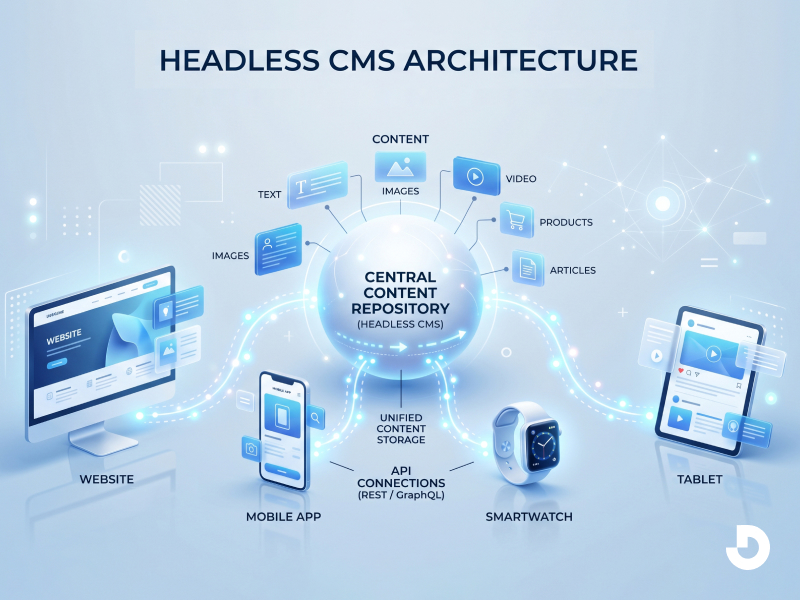
Instead, it delivers raw content through an API. An API is just a messenger. It takes the content from the back end and sends it to any device you want. This could be a website, a phone app, or even a digital kiosk in a store.
A headless CMS is a back-end-only content management system that stores and delivers raw content via APIs without a built-in presentation layer. Unlike traditional platforms, it separates the content repository from the design framework. This content management system architecture allows developers to push the same text and images to websites, mobile apps, smartwatches, and IoT devices simultaneously. Marketers can update content in one place, and it deploys everywhere instantly. The "head" refers to the front-end display. Removing the head gives you total flexibility.
Traditional content management system architecture ties your content to a specific theme or template. If you want to redesign the site, you often risk breaking the content. You might need to migrate everything.
With a headless setup, the architecture is decoupled. The database lives on its own. The delivery method is separate. This means you can change the entire front end without touching the content. Your blog posts, product descriptions, and images stay exactly where they are.
This architecture uses APIs to connect layers. You might have a React app for your website. An iOS app for your mobile users. And a voice app for smart speakers. All three can pull from the same headless cms without duplicating work.
Let us compare headless cms vs traditional cms directly. Traditional systems like WordPress or Drupal give you a complete package. You get the admin panel, the database, and the front-end theme all in one place. This is easy to start. You install it, pick a theme, and add content.
But there is a limit. Your content is locked into that specific theme. If the theme has bad code, your site is slow. If you want to build a mobile app, you cannot reuse the same content easily. You have to build a separate system.
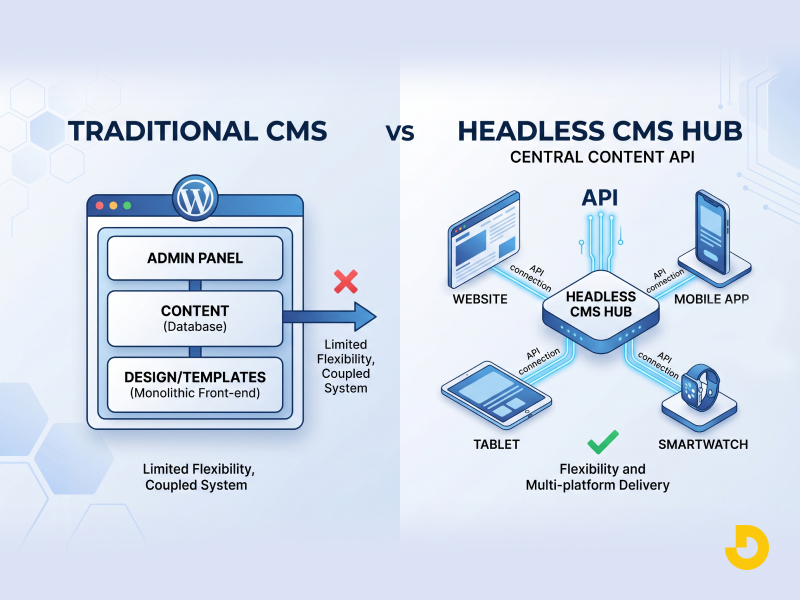
A headless cms gives you just the admin panel and the database. It does not care about the design. You can build the front end with any tool. This freedom is powerful for teams with developers. But it requires more work upfront. There is no "install and go" theme.
Here is a simple breakdown:
Not every project needs a headless setup. But some situations make it the right choice.
Multiple platforms. If you publish to a website, a mobile app, and a digital billboard, use headless content management systems. You write once. The API sends the content everywhere.
Fast performance. Traditional systems often load extra code that slows down the page. A headless front end can be built with static files. These load almost instantly. This helps with user experience and SEO.
Developer flexibility. Your team might want to use modern tools like Next.js or Gatsby. A headless system does not block them. They can choose the best technology for the job.
Content reuse. A product description should look the same on the website and the app. With a headless system, it does. You do not copy and paste between two different systems.
APIs are the backbone of this model. When you open a webpage built on a headless cms, the browser asks the API for content. The API grabs the text and images from the database and sends them back. This happens in milliseconds.

There are two common API types. REST and GraphQL. Both work well. REST is older and simpler. GraphQL is newer and lets you ask for specific pieces of data. You do not need to be a developer to understand the concept. Just know that the API is the messenger. It keeps everything connected.
This is not a perfect solution for everyone. You need to be honest about the downsides.
Technical skill required. A traditional CMS lets you install a theme and start typing. A headless system does not show you a preview of your page inside the editor. You have to build that preview yourself. Without a developer, you will struggle.
No front-end templates. There is no button to change the font or move a sidebar. Everything on the screen must be coded from scratch. This takes time and money.
Plugin limitations. Traditional systems have thousands of plugins for forms, SEO, and analytics. Headless systems rely on custom code or third-party services. You might need to piece together multiple tools.
Real-time preview is harder. When you edit a blog post in WordPress, you see exactly what it will look like. In a headless system, the editor only sees raw text. To see the final design, you need a separate preview environment.
Several companies build headless content management systems. Each has a different focus.
At Designocracy, we recommend starting with a platform that offers a generous free tier. Test the workflow before committing.
| Feature | Traditional CMS | Headless CMS |
|---|---|---|
| Content & design coupling | Tightly coupled (theme + content in one) | Decoupled – content lives separately |
| Front-end delivery | Built-in themes & templates | Custom-built with any framework (React, Vue, etc.) |
| Multi-channel publishing | Limited (mostly web) | Native – website, mobile apps, IoT, smart devices |
| Developer flexibility | Constrained by theme/plugin ecosystem | Full stack freedom; use modern tools (Next.js, Gatsby) |
| Content reuse | Often duplicated across platforms | Write once, deliver anywhere via API |
| Performance & speed | Can be heavy; theme bloat | Lightweight, static-site friendly, faster |
| Ease of use (non-developers) | 👍 High – install theme, start editing | 👎 Steep – requires custom front-end build |
| Real-time preview | Built-in WYSIWYG preview | Harder; requires separate preview environment |
Ask yourself three questions.
First, do you need to send the same content to a website and a mobile app? If yes, consider headless.
Second, do you have a developer on your team or budget to hire one? If no, stick with a traditional CMS for now.
Third, does page speed directly impact your revenue? For e-commerce sites, faster pages mean more sales. Headless can help here.
If you answered yes to the first question and yes to the second, headless is worth exploring. If you are a solo blogger or a small local business, a traditional CMS is probably the better fit.
The industry is moving toward API-first tools. Even traditional CMS platforms now offer headless options. WordPress has an API. Drupal has one too. This tells you something. Separating content from design is becoming a standard practice.
But that does not mean everyone should switch today. The best tool is the one that lets you work efficiently. A headless cms solves specific problems. It is not a magic upgrade for every site.
Headless content management systems give you freedom. You can publish anywhere. You can use modern development tools. You can scale without hitting design limits.
But you pay for that freedom with complexity. You need technical skills or developer help. You lose the convenience of pre-made themes.
Understand your project needs first. If you manage a single blog, stay with a traditional CMS. If you run a business with a website, an app, and future plans for smart devices, headless is worth the investment.